
Writing a reflection
Writing, speaking and letters in Reflections are free. The daily reflection Hamdam writes for you on Today is fifteen a calendar month on the free tier; Hamdam Plus has no limit.
A reflection is a private note to yourself. It can be a sentence or a page. It can sit beside the day's verse or stand on its own.
There are two ways in. On Today, the reflection button asks how the day feels and gives you a reflection written for it. In Reflections, the round button lets you write in your own words, with no verse needed.
Your reflections never leave your own devices and your own iCloud. Family who join you from their own iCloud never see a single one of them.
Step by step
Open Reflections and stay on Journal.
Reflectionsتأملات
Tap the round button in the corner. On Journal it starts a new reflection.
Write. A sentence is enough. Where your device offers Apple's Writing Tools they work here too; they are not offered for Persian text.
Add a mark for how it felt if you want one. Any emoji will do.
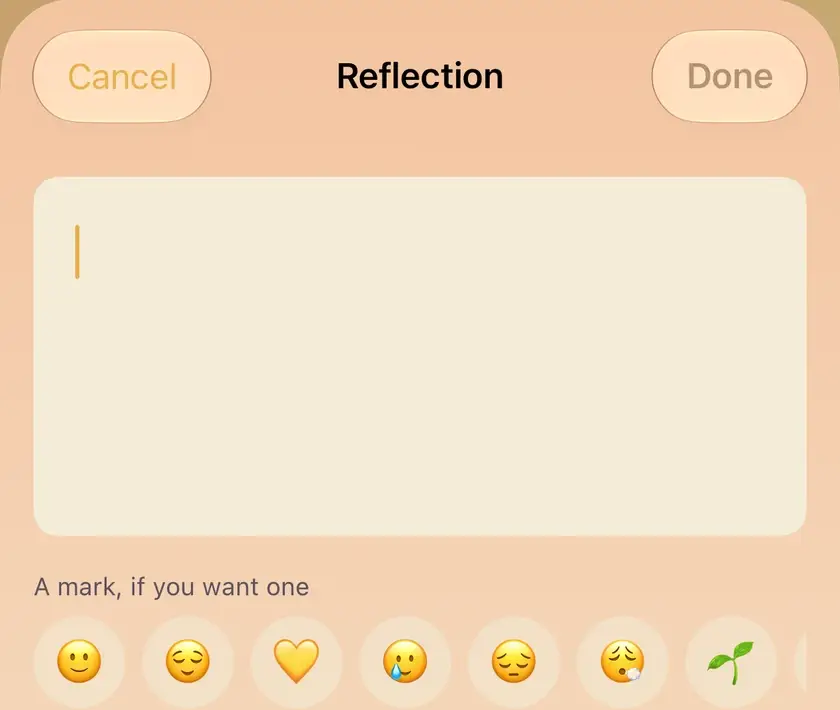
Tap Done. The entry appears in Journal and your streak moves.
Doneتمام
To speak instead, switch to Voice and tap the round button. The recording is kept first, and the words are written down on your device afterwards when they can be made out.
To write to yourself later, switch to Letters. Choose a year, five years or ten, or any day from tomorrow. A sealed letter shows its date and not its words until then.
A reflection Hamdam wrote for you on Today can carry your own words too. Open it in Journal and write in the note underneath.
Your note (optional)یادداشت تو (اختیاری)

Worth knowing
- The free tier allows fifteen daily reflections from Today each calendar month. The counter resets on its own when the month turns. Your Hamdam, under Membership, shows how many are left.
- Writing in Journal, speaking in Voice and writing Letters do not count towards that limit, and the mark on a reflection is free everywhere.
- With Hamdam Plus, Deep Mode adds a few optional follow-up questions under a Journal entry. Turn it on in Your Hamdam, under Content.
- What you write is stored on your device, apart from a copy of your ten most recent reflections kept in your own iCloud so your Apple Watch can show them. With Hamdam Plus, Sync with iCloud carries it to your own iCloud and your other devices; it is in Your Hamdam, under Sync.
- The streak forgives a missed day. It is there to be kind, not to be a score.