
Finding what you have written
Recent, the last three days, is free, and so are Favourites, Voice, Letters and Wisdom. Archive, everything older, is Hamdam Plus.
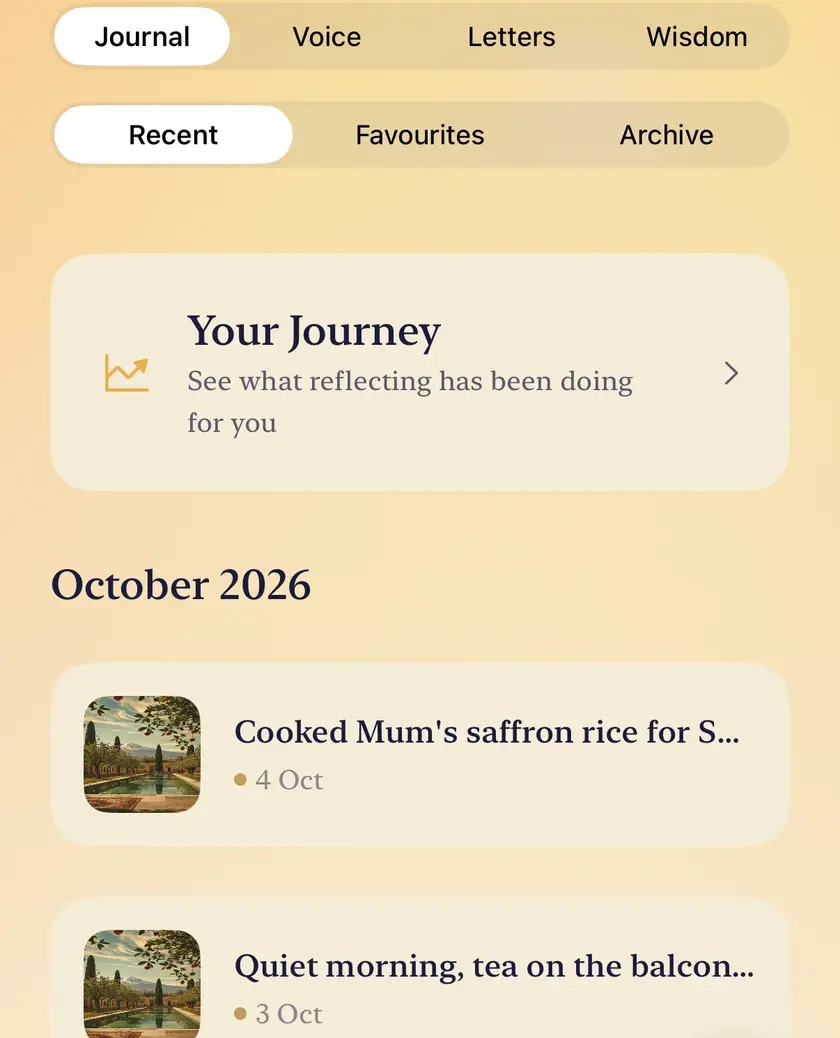
Everything you write, say or seal lands in Reflections. Four segments run across the top: Journal, Voice, Letters and Wisdom. Journal has three of its own underneath: Recent, Favourites and Archive.
Step by step
Open Reflections.
Reflectionsتأملات
Journal holds your written reflections, including the ones saved from Today. Recent is the default: the last three days, grouped by month.
Favourites holds the verses you have marked with the heart.
Archive holds everything older than three days. This is where Hamdam Plus begins.
Voice holds your spoken reflections, with the words underneath when they could be written down.
Letters holds your letters to your future self. A sealed one shows only the day it opens; you can open it early, after a confirmation.
Wisdom shows what keeps returning in your own words, once there is enough to see it. The words are counted on your device, and where Apple Intelligence is on, a one line reading sits above them, labelled as the model's.
Tap Your Journey, at the top of Recent, for how your days have moved over time.
Open any entry to read it, add a note of your own, or delete it.

Worth knowing
- Nothing is deleted when an entry passes into the Archive. The entries are on your device the whole time; the free tier simply does not open that far back.
- Your Journey shows the shape of your mood and your writing over time. On the free tier it looks at the last fourteen days, and once, when you have thirty days of history, it opens thirty days for a single look. The weather and sleep patterns, the weekly rhythm and the written observation about your pattern are Hamdam Plus.
- There is no search field in Reflections. To find an entry by its words, turn on Include reflections in system search in Your Hamdam, under Sync, and use Search on your iPhone or iPad.