
Roots, rebuilt around people
A family is not a list of names. Roots now holds your people, the ties between them, and what is attached to each one: stories, photos, voices, places, traditions and the things they said.
It sits just below the calendar, above every cultural section, and it looks the same for everybody, whatever your heritage or language.
Step by step
Open Roots. Your family is just below the calendar, under Your Family Story.
Rootsریشهها
On a new Roots there is an invitation and an Add someone button. Tap it.
Add yourself first, and turn on This is me. Generations are counted outward from that person.
Add each relative with a name and a relation. Mum, Dad, a brother, a sister, a wife, a husband, a son or a daughter draw a line between the two of you. Grandma, an uncle or a cousin is placed on the right row without a line being invented.
Leave a year blank if nobody remembers it. With the full date, Hamdam marks it on Today when it comes round each year.
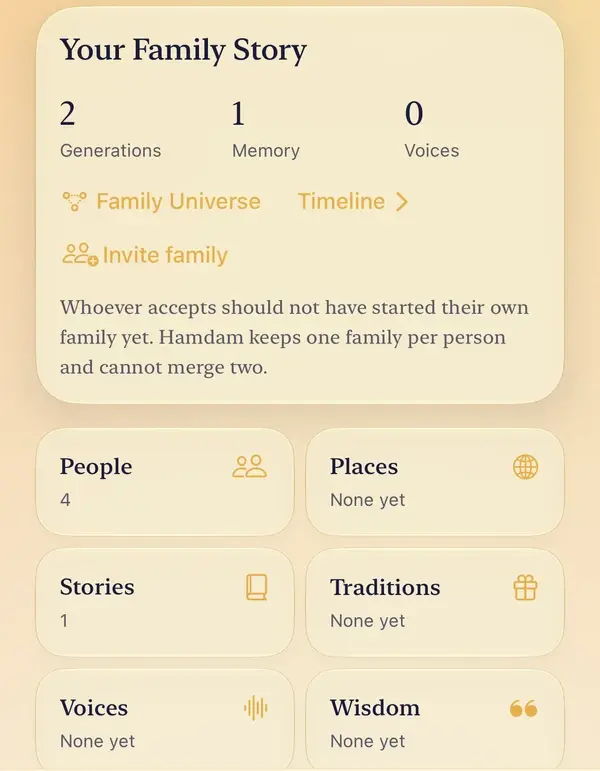
Once there is more than one person, the card shows your generations, memories and voices, with Family Universe and Timeline beneath.
Family Universe lays out faces by generation, with threads between parent and child. The Gens control sets how many generations either side of you are drawn.
Tap a person for their own page: their face, their dates, and their stories, photos, voices and sayings. Choose a photo for them there, or add a story or something they said.
The six tiles under the card open People, Places, Stories, Traditions, Voices and Wisdom, and each list has its own way to add to it.

Worth knowing
- Deleting a person asks first, and names the stories, voices and photos attached to them. In a family you share, it removes them for everyone.
- None of this needs Hamdam Plus.
- The labels on these screens are written into the family screens themselves rather than the app's shared label list, so the guide quotes none of them in Farsi.