
Daily reminders
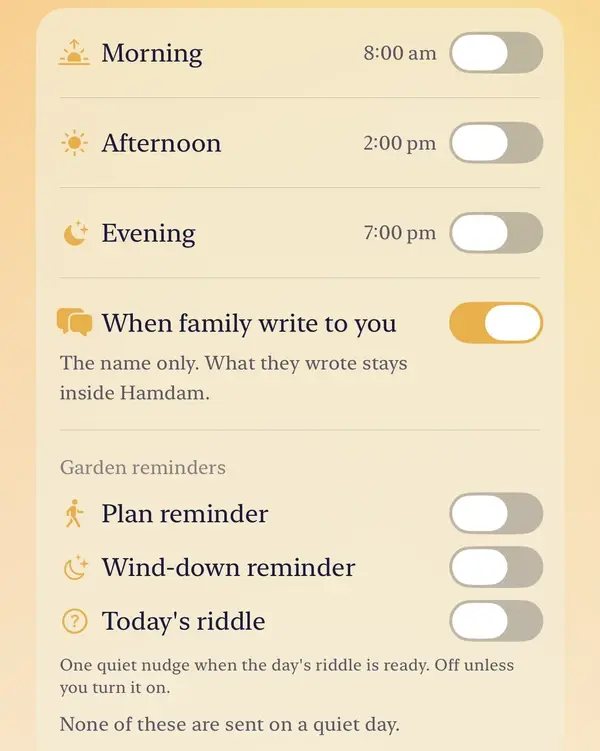
Hamdam has three daily slots, and each one is its own switch. You can have all three, one, or none.
A daily notification carries a verse chosen for that day and that slot, a different one in each, or for a reader who does not meet the poets, a short line in the same voice as Today, sometimes toned to how your recent days have gone. It never carries anything you wrote, because a lock screen is not private.
Step by step
Open Your Hamdam.
Your Hamdamهمدم تو
Tap Notifications.
Notificationsاعلانها
Switch on the slots you want. The first time, your device asks for permission; tap Allow.
Morningصبح
The afternoon slot.
Afternoonبعدازظهر
The evening slot.
Eveningعصر
Cultural moments, on unless you turn it off, sends a gentle word on the eve of Yalda, Norooz and Chaharshanbe Suri. It works even with every daily slot off.
Cultural momentsمناسبتهای فرهنگی
The family switch, on by default, tells you when somebody in your family writes to you. The notification shows their name only; what they wrote stays inside Hamdam.
When family write to youوقتی خانواده برایت مینویسند
Once a daily slot is on, Learn my rhythm lets Hamdam shift the timing towards the hours you actually open it. Clear what Hamdam learned starts it again.
Learn my rhythmآموختن ریتم من

Worth knowing
- The Garden has reminders of its own on the same screen: a plan reminder, a wind-down reminder and today's riddle. None of them is sent on a quiet day.
- Hamdam also asks once, after your first daily reflection, whether you would like reminders.
- If nothing arrives at all, the switch that matters is not in Hamdam. Open the Settings app, then Notifications, then Hamdam, and check that Allow Notifications is on. While it is off, this screen says so and offers a button straight there.