
Setting Hamdam up the first time
Hamdam asks a short series of questions when you first open it. None of them is a sign-up. They exist so the app can resolve the right content for you rather than giving everyone the same thing.
Two answers do most of the work: where you were born, and which language you read. Choose Farsi and Hamdam speaks to you through the poets, in Persian. Choose English and say you were born in Iran, Afghanistan or Tajikistan, and you meet the same poets in English translation, with no Persian script. Otherwise Hamdam leaves the poets out: Today leads with a reflection in plain words, and Roots carries your own country's moments.
Step by step
On the welcome screen, choose Quick setup or Full setup. Neither asks you to buy anything, and there is no sign up. The privacy promise is one line on this screen.
Quick setupراهاندازی سریع
Choose your language. Hamdam pre-selects whichever your device is already set to.
Choose your languageزبانت را انتخاب کن
Full setup only: say why you are here, give your name or skip it, and say how Hamdam should greet you or skip it. Quick setup asks these later, on a card on Today after your first reflection.
Full setupراهاندازی کامل
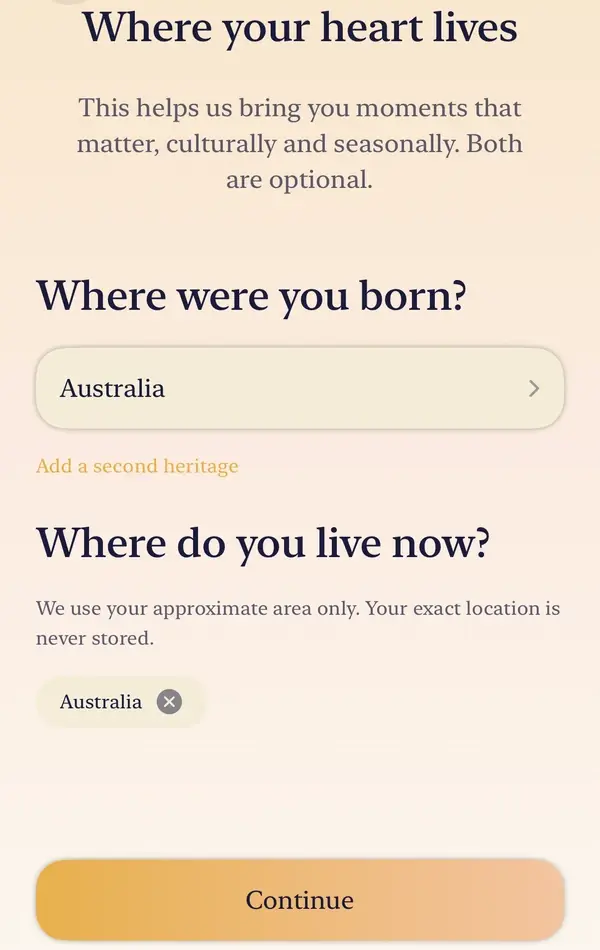
Say where you were born, and add a second heritage if you have one. This is the answer that decides whether you meet the poets.
Where were you born?کجا به دنیا آمدهای؟
Say where you live now, either from your approximate location or by choosing your country. Your exact location is never stored. Both this and the question above are optional.
Where do you live now?الان کجا زندگی میکنی؟
If you have no Persian connection, Hamdam asks whether you would like a daily verse from the poets in English. It is off unless you say yes, and you can change it later in About You.
Would you like a daily verse from Rumi, Hafez and Khayyam, in English?دوست داری هر روز بیتی از مولانا، حافظ و خیام به زبان انگلیسی بخوانی؟
Full setup ends with the optional companions. In Quick setup they are offered the first time you open the Garden. Either way you land on Today, at the verse.
Companionsهمدمان

Worth knowing
- Every answer can be changed afterwards in Your Hamdam, under About You: your name, how Hamdam greets you, where you were born, where you live, and the language.
- Country names come from your device's own language data, so they appear the way your device would write them.
- Delete the app and put it back, and your settings come back with it: your name, why you are here, where you were born and where you live, how Hamdam greets you, and most of your switches, so you are not walked through these questions again. Your app language and the Morning, Afternoon, Evening and Cultural moments reminders are not among them, so set those again. They are kept in your own iCloud.
- A permission belongs to a device rather than a person, so the Health, calendar and Apple Music switches stay with the device that granted them and are asked for again on a new one. Your Hamdam, under Sync, shows when your settings were last brought back.